The model
Splitting the money into categories
Every category is a money goal, never a percentage. And they all start over when a new cycle begins.
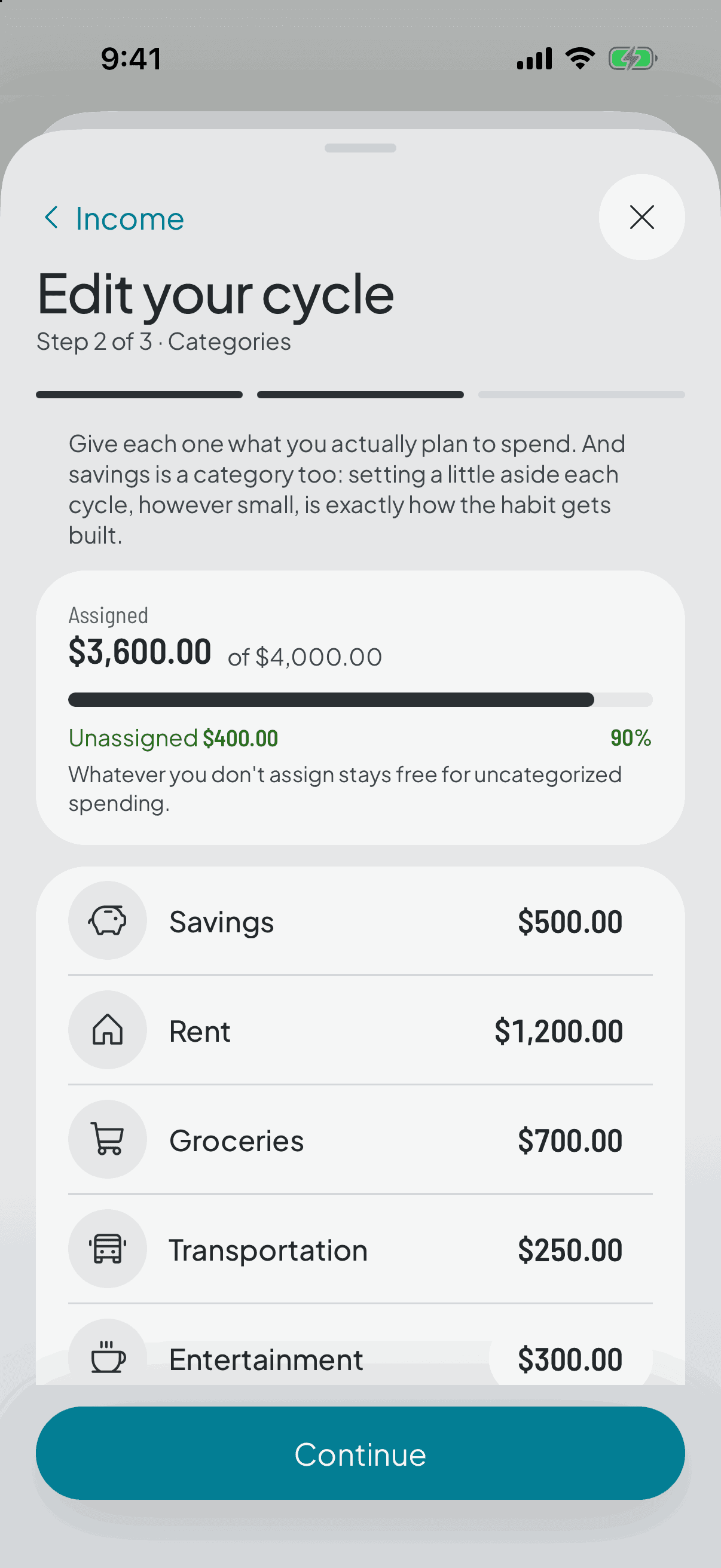
A category is an amount, not a percentage
When you split, each category gets a figure: this much for groceries, this much for transport, this much for going out. Not 20%, not 15%.
A percentage reads well in an article and is useless in the checkout queue. What you need there is how much grocery money is left, and that's an amount, not a share.
How the split works
You start from what came in this cycle and assign amounts. The app won't let you split more than you have: while the total goes over your income, you can't move on.
One tip that saves a lot of friction: start with four or five categories. Adding one later is easy; dragging fifteen you never look at is not.
Changing them doesn't rewrite the past
Every cycle keeps a snapshot of the target each category had. Raise the grocery amount today and the change applies from the current cycle onwards; cycles already closed keep the target they were lived with.
That's what makes the history worth anything: if changing a target rewrote the old cycles, comparing against them would tell you nothing.
And a category is never deleted, only archived. It stops appearing in your cycle, but its expenses are still there and still count in the history.
They all reset each cycle
When a new cycle opens, every category is back to its amount: groceries are whole again, even if last cycle you ran out on day twelve. Each period stands on its own, without carrying guilt over from the last one.
The one exception is savings, which carries over. It has its own page.