The model
Your cycle starts on payday
Thrymo doesn't organise your money by calendar months. It runs on the stretch from one payday to the next — the idea to understand first.
What a cycle is
A cycle is the stretch between one payday and the next. That's the money you're really managing: what landed last payday has to reach the next one.
Paid on the 15th? Your cycle runs from the 15th to the 15th. Paid every two weeks? You get two cycles inside a month. Thrymo follows your calendar, not the one on the wall.
Why not the 1st
Most budgeting apps cut the year into calendar months. Tidy on paper — but if you're paid mid-month your money arrives in two pieces that line up with nothing: the first half of the month is covered by last month's pay, the second half by this one's.
Anchoring the cycle to payday fixes three things at once:
- You see what's left until you're paid again, which is the question you were actually asking.
- No mental arithmetic to work out which part of the month was already covered.
- Every cycle opens on a number that exists: what just came in.
How a cycle starts
When you open a cycle you record what came in and split it across your categories. The first time you build them yourself: savings is the only one already there, and the app asks for a couple more at least. That's on purpose — naming your own categories and typing your own money is the habit this step teaches.
From then on, every expense you log comes off the category it belongs to, and the main screen shows what's still available.
Splitting is the step you'll want to skip and the one that pays for itself. Five minutes at the start save you the rest of the cycle wondering where it all went.
And it isn't a decision for life: you can change the income and the split mid-cycle, without closing it. The expenses you already logged stay as they are.
Knowing whether you're on pace
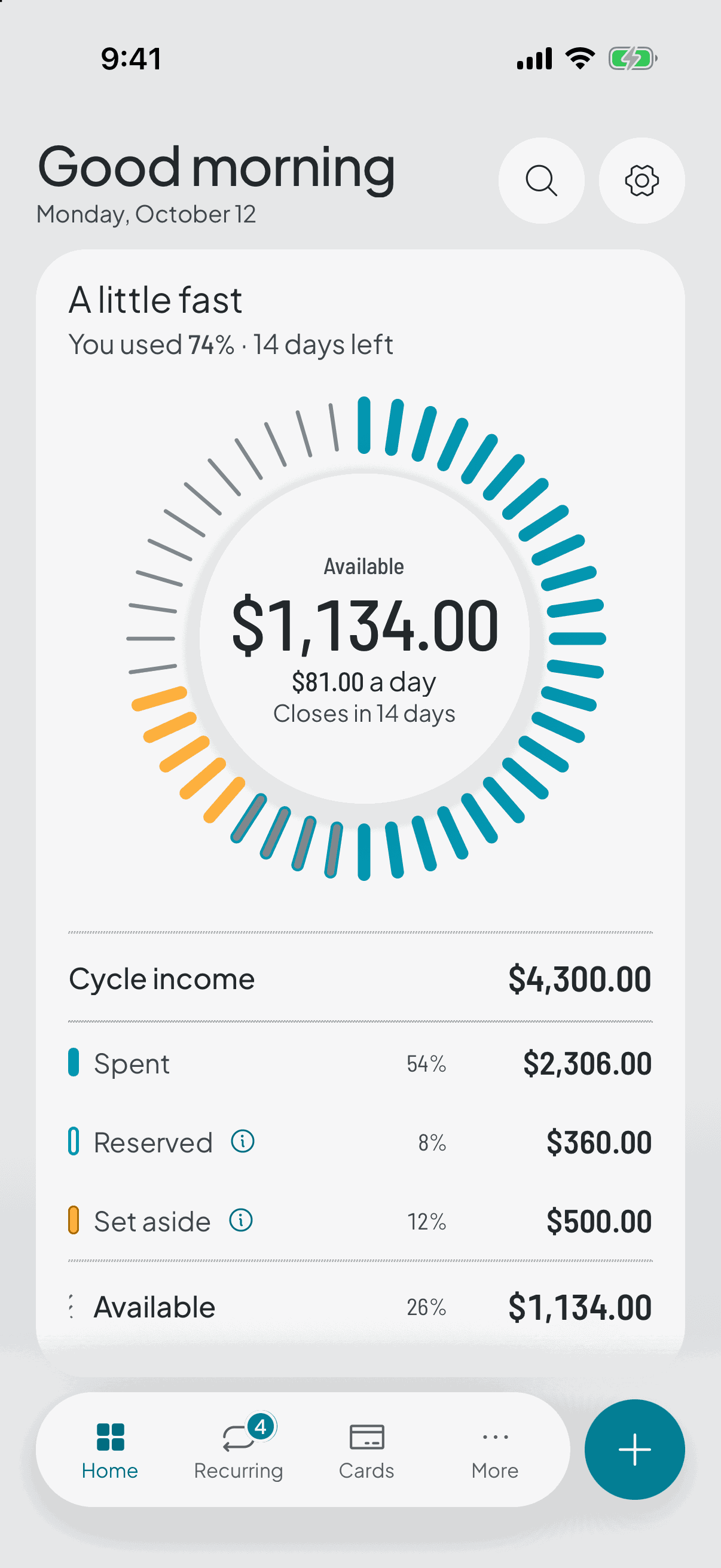
During the cycle, the main screen answers a single question: how much you have left to spend. Underneath it breaks that number down — what came in, what's been spent, what's set aside in savings and what's reserved for recurring expenses — so you never have to take it on faith.
Next to it sits the figure that gives it meaning: how many days are left before the close. The same amount means opposite things with three days to go and with twenty-five, so the app weighs the days you've used against the money you've used and tells you if you're heading over.
Below that, the list switches between two views: Categories, each with its progress, and Expenses, what you've logged so far. The hero doesn't change when you switch — the same ring, the same available money: they're two ways of looking at the same thing, not two modes of using the app.
When money arrives that wasn't expected
A transfer from family, a bit of freelance work, a refund. That goes in as extra income and lifts what's available this cycle, but it doesn't re-split anything: your category targets stay exactly where you put them.
And if you don't spend it, it isn't lost — it swells what's left over when the cycle closes.
And when it ends
There's no close button. When the date arrives the cycle rolls over on its own: open the app and the close is waiting for you, you see how it went, and the next one opens.
That's the moment you compare what you planned with what actually happened, and use it to adjust the next split.